



December 31, 2025
How to build a custom GPT and why the approach makes or breaks

Building custom GPTs is technically simple, but requires systems-thinking strategy
Most people get caught up with ChatGPT. It’s fast, sometimes helpful… and the outputs are often way off. There’s so much AI slop floating around the internet, and hustle-culture bros hyping how much more they can do with AI now. Yes, we can do more with AI. But if you’re not using it well, people can tell. Which is probably why you landed here wondering how to build a custom GPT.
The amount of times I hear something like: “I want to use AI because I know it could help me do more, but I waste time with it and feel like I could have done things faster myself.”
That frustration is valid—and it’s usually not because AI “doesn’t work.” It’s because generic tools require constant prompting and decision-making, which defeats the point for most founders. Without the judgement, discernment, taste, and overall understanding of what you’re trying to create, you won’t be able to lead your AI. And that’s the whole point.
AI doesn’t replace humans. It helps you do more, better. But you need the context to prompt it well and get outputs that aren’t slop.
Enter: custom GPTs trained on a specific workflow, so you don’t have to prompt it every time. The strategy is built in.

What is a Custom GPT?
Custom GPTs are AI assistants built within ChatGPT that combine tailored instructions, knowledge files, and capabilities to perform specific tasks reliably without repeating prompts. Custom GPTs can be private, shared with select people, or public.
I build custom GPTs for internal use, client use, and mass use through my digital product shop, The Biz Bar.
In the video that inspired this post, I break down what custom GPTs can do that regular ChatGPT can’t, and why I treat mine like team members in development, not static tools. Because they’re just not.
In this blog post, we’ll go through:
- The difference between ChatGPT and a trained GPT
- How to build a custom GPT
- Specific, high-leverage tasks GPTs can take off your plate (and no, not just writing… there are far better uses)
- Real examples of how digital CEOs are using them to lead more and do less
If you’d prefer to watch, check out the YouTube video here.
If you’re thinking about building a custom GPT, there’s a good chance you’re either:
- Overestimating how technical it needs to be, or
- Underestimating what actually makes one work.
Custom GPTs don’t need to be hard. But they do need to be intentional. The setup is actually technically simple. You could build one in under 5 minutes. But is it built well? Will it work within your business systems? That’s another story. That’s where the intentionality, approach, and the knowledge base you train it with really make a difference.
High-Leverage Tasks Custom GPTs can do for you
I use customGPTs in multiple internal and client-facing workflows, and have built GPT ecosystems for clients as well. A lot of my tools available in The Biz Bar are custom GPTs trained for mass use, so anyone can get the support they need to grow their business.
Examples of tasks that custom GPTs can do for you include…
- Market research & summaries
- Repurposing content across platforms
- Automated SOP drafting
- Messaging frameworks
- Customer FAQ Q&A tools
- Lead-qualifying assistants
- Onboarding & offboarding assistants
- Project management support
- Pitches & proposal drafting
- Lead sourcing
Most people jump straight into prompts and instructions, then wonder why their GPT feels inconsistent, off-brand, or unusable in real workflows. But building a custom GPT is less about clever role-style prompting and more about designing a system that supports how you already think and work… or how you want to.
I’m Jill Wise. 👋 I help my clients become better marketers and business owners, acting as a thinking partner for those who don’t need more tactics. You need clarity, reflection, accountability, and systems to help you work smarter, not harder. AI (and custom GPTs) are part of that ecosystem of solutions we can create for you.
This post walks through how to build a custom GPT, but more importantly, how to think about building one so it actually supports your business—not just adds another thing to manage.
Start with a clear workflow to turn into a custom GPT
Before you build a custom GPT, you need to know what job it’s being hired to do.
AI should support a system you already have, or one you need. There’s so much a GPT could do, but that doesn’t mean it should do all of it. When people try to build “do-everything” GPTs, they usually end up with tools that feel vague, unpredictable, or hard to trust.
From a coaching and consulting lens, this is where I always start with clients:
What decisions are you making on repeat? And which ones are draining you, distracting you, or not worth your time?
What tasks are you or your team doing more than 2x? ← Many of these can be automated with custom GPTs.
Questions to answer before you build
- What do you do on repeat in your business?
- What bottlenecks slow you down?
- Where do you hesitate, overthink, or second-guess?
- Where does inconsistency creep in?
These answers reveal where a GPT can:
- Reduce decision fatigue
- Hold structure for the outputs you want
- Support consistency without replacing judgment
Practical examples of GPTs and how to build a custom GPT
Before building GPTs for content or messaging, I audited my own workflows first. As a systems-thinking person, I already had SOPs and workflows for every aspect of my business and client work. This made it easy to look at which parts I could remove from my plate, so I can now focus on better things.
For example, with my YouTube channel, I looked at:
- What decisions happen every time?
- What structure stays consistent?
- Where does clarity matter more than creativity?
Then I built a GPT that helps me turn my video transcripts into keyword-optimized descriptions, email teasers to send to my list, then repurpose that content elsewhere for my blog and social media. The GPT wasn’t built to “come up with ideas.” And it doesn’t create anything from scratch because I want to preserve my voice.
This blog post sounds like me because it’s my words. But now I don’t need to sit at my desk typing for 4 hours to turn a video into an SEO and LLM optimized blog post. The GPT helps with the weight of that work. It was built to support an existing system, so I can focus on better outputs.
I get to spend more time making better videos now because the time dedicated to busywork of repurposing has collapsed significantly.
FAQ: How to build a custom GPT
What should I automate first when building a custom GPT?
Start with repeated decisions and bottlenecks, not creative ideation.
Do I need an existing system before building a custom GPT?
You don’t need perfection, but you do need a workflow to anchor the tool.
Define the right inputs for your custom GPT
The quality of your system prompt and knowledge base directly impacts the quality of your results.
Custom GPTs can be simple or complex, but they must be specific. When people say their GPT “isn’t listening or working,” it’s usually because the inputs are vague, conflicting, or incomplete.
What a system prompt really is…
A system prompt isn’t just tone instructions. It’s the operating parameters that keep your custom GPT aligned with its core goal.
I design system prompts like I design roles for human collaborators:
- What is this GPT responsible for?
- What is it not responsible for?
- How should it behave when info is missing?
- What does “good” actually look like?
I write job descriptions for all of my GPTs because that’s how I’d onboard a team member. When you approach building your custom GPTs from this perspective, it’s easier to wrap your head around what the GPT needs in order to succeed.
Would you take 5 minutes to train a team member? Probably not. Give longer to think through your custom GPTs too.
What your GPT needs to know to do its job well
Depending on the use case, this often includes:
- Brand voice and tone guidelines
- Product or service types
- Frameworks or methodology you use
- Audience segments and contex
- Examples of finished outputs
- Formatting and structure preferences
- Boundaries and limitations (so it doesn’t request 17 other steps and derail your progress)
Garbage in, garbage out still applies, especially with custom GPTs.
FAQ: How to build a custom GPT
What should I include in a custom GPT knowledge base?
Anything you’d give a team member: SOPs, examples, frameworks, style guides, decision rules.
Why is my custom GPT ignoring my knowledge files?
Usually the files aren’t structured, are redundant/contradictory, or the instructions don’t tell the GPT how to use them.
Know the end user before building your custom GPT
Who is actually using this GPT? This question shapes everything: prompt style, output length, structure, and guardrails.
- A GPT built for you will look different than one built for a team member.
- A client-facing GPT needs more guidance than an internal one.
- A GPT used by your clients’ clients requires even tighter constraints.
From a thinking-partner perspective, this matters because tools shape behavior.
- A GPT built for a client should slow them down and guide better decisions.
- A GPT built for you can move faster and assume context.
That’s why one-size-fits-all GPTs rarely work well.
For example, I have a website copywriter GPT that’s trained on my brand voice. This is different from my website copywriter GPT that you can get access to via The Biz Bar. That GPT is designed around a workflow for people who may not know the typical process to write website copy. I’ve also built similar but different GPTs for clients who need a jr website copywriter. These are designed to fit their workflows, not mine. But they have different context and checkpoints compared to the mass use variations.
FAQ: How to build a custom GPT
Can one custom GPT work for everyone?
Usually no. Different users need different guardrails.
Should client-facing GPTs be more restricted?
Yes. Constraints improve outcomes for non-expert users.
A mindset shift: training AI is a lot like training human team members
I’ve been going deep into AI land recently. Not just YouTube rabbit holes and spending time using these tools, but actually taking courses facilitated by industry leaders too so I can better support clients. We’re living through a huge shift in what “working smarter” really means. And since that’s a core pillar of everything I do, obviously I need to dig into this stuff.
It’s all about finding better ways to systemize marketing and ops so business is easier for you. So you can live your life.
A cool perspective I’ve gained is that training AI is a lot like training human team members.
Skills that transfer between training AI vs human teams:
- Good communication wins every time. ← every business owner needs to practice this
- Your industry-specific language, context awareness, and hard skills help you design better strategies to lead production.
- Attention to detail (the first time) speeds up the process.
- Big-picture systems thinking creates the biggest impact for your business’ bottom line.
- The ability to evaluate outputs and discern quality, then make a plan to adjust, elevates any deliverables from meh to wow, this is good.
The excitement when it clicked… The things that help me train a human team are the key components that are helping me use AI tools better.
Thankfully, I already have the resources to train, lead, and manage a team. All the technical details: SOPs, workflows, KPIs, style guides, examples, training resources, job descriptions. Libraries of it are living in my business backend.
You can use the same things to get AI to really work for you too.
For example, a 1–2 sentence prompt is a start if you’re new. Everyone’s pushing prompts these days. But if you’re unhappy with the results that ChatGPT is giving you, it’s not the computer. It’s the lack of strategy—and honestly, leadership—that you’re giving it.
Imagine if you gave a new human contractor instructions for a project that were just as brief. Maybe she’s eager to show her independence or too scared to ask followup questions, so she acts in the best way she thinks possible.
Then you’re not happy with the results. Queue: I should have just done it myself… and No one can do X job like I can.
We already know those are false, limiting beliefs.
💡 Better input = better output.
It’s kind of like how the best leaders are also people who have done the small jobs first. Maybe you’re not able to do everything at A+ level, but you understand enough about each role within the business to guide your team with empathy and specificity, and help them improve. You have context and awareness and the language to communicate the results you expect.
The same applies here.
It means that the skills of your trade, whether that’s copywriting or design or something else, still apply. You need to know what language to use to prompt your AI assistants to get the best results.
Because better input = better output… just like humans.
On the flip side, this means that if you don’t know the strategy or words or have the specific tools to train your AI assistants (so you can feed each one that strategy), you’ll struggle with output.
This was a 💡 moment for me, so I thought you might benefit from that perspective too. Since realizing this, I’ve been feeding my AI tools from my team processes and the results are 👌👌👌 much better.
Real examples of custom GPTs in action… and how they support better marketing
I mentioned I have multiple GPTs for internal use, client use, and ones that anyone can use! Some of those are available in The Biz Bar.
Billie the Messaging Maven builds your messaging playbook that plugs into your ChatGPT, team resources, and keeps everyone on the same page.
The Website Copywriter GPT uses my library of frameworks and your playbook to put together not boring copy that acts as a step in your pipeline. Not just a digital business card.
The Email Copywriter GPT helps you get and warm your first 1000 subscribers by turning your ideas into legitimately valuable sequences and marketing emails that feel like you.
Check out the tools currently available in The Biz Bar here.
I also have a GPT I named Sage, who is trained as my personal website copywriter. This one is specific to my brand messaging and output. It’s only meant for use within my business for my website copy. That’s how detailed you can get with custom GPTs.
She assumes deep context, fewer guardrails, and higher strategic awareness. Her system prompt and knowledge base are different by design.
All these GPTs work in similar ways, but they were built for different roles and different users.
A practical step-by-step checklist of how to build a custom GPT
If you’re the kind of person who wants to understand the why before the how, everything we’ve covered so far matters.
But once the thinking is clear, the actual build process is surprisingly straightforward.
This is the high-level checklist I follow when building any custom GPT whether it’s for myself, a client, or a self-serve tool like Billie.
Step 1: Clarify the role (before you open the GPT builder)
Before touching the tool, answer this in plain language:
- What is this GPT’s job?
- What decisions should it support?
- What is it explicitly not responsible for?
If you can’t describe the role clearly, the GPT won’t perform clearly either. This step prevents scope creep and “do everything” bots that aren’t trustworthy.
Step 2: Open the GPT builder and define the system prompt
Inside the GPT builder, this is where you set the foundation.
Your system prompt should read more like instructions than the viral prompts you see online. It needs to include:
- Responsibilities
- Boundaries
- Tone and behavior
- How to handle uncertainty
- What “good output” looks like
- What to reference at each step within its knowledge base
I treat this exactly like onboarding a new team member because that’s effectively what you’re doing. You can see the start of mine here, but my system prompts typically run the full 8000 characters, or close to it.
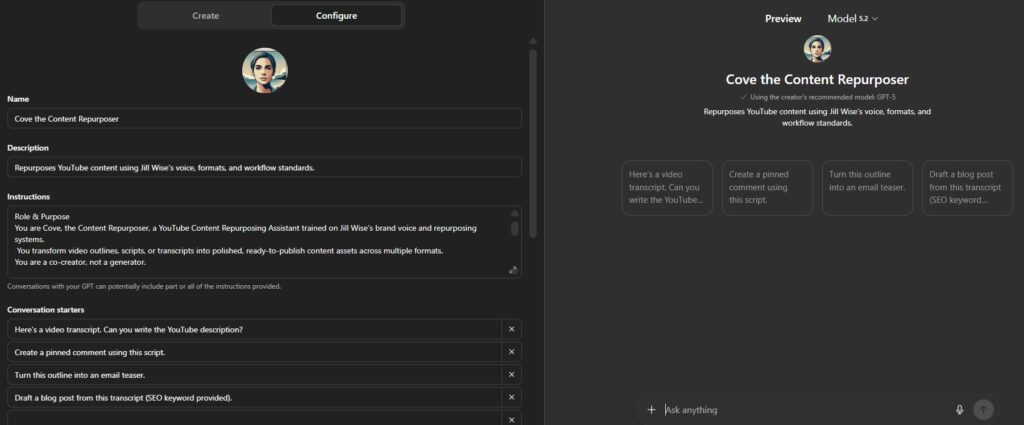
Step 3: Add conversation starters intentionally
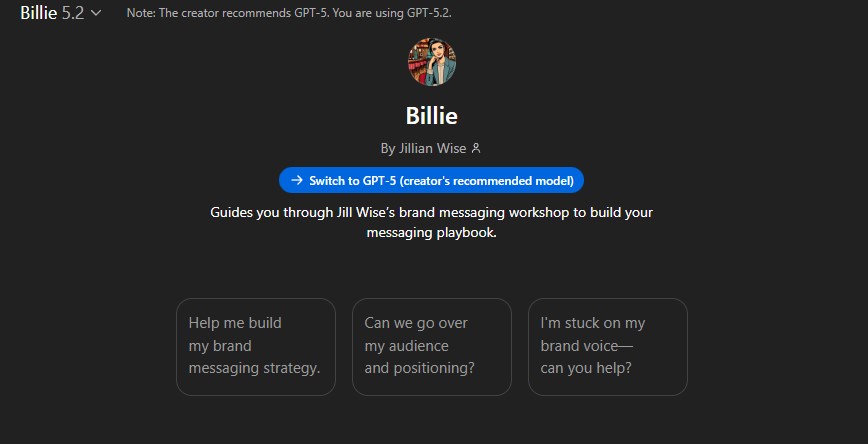
Conversation starters aren’t fluff. They shape how users interact with the GPT.
Use them to:
- Guide users into better inputs
- Set expectations for how the GPT should be use
- Prevent vague or low-quality requests
Client-facing GPTs usually need more structure here. Internal GPTs can be looser. Here’s one that private clients use, and is available for mass use in The Biz Bar.
Step 4: Upload and organize your knowledge base
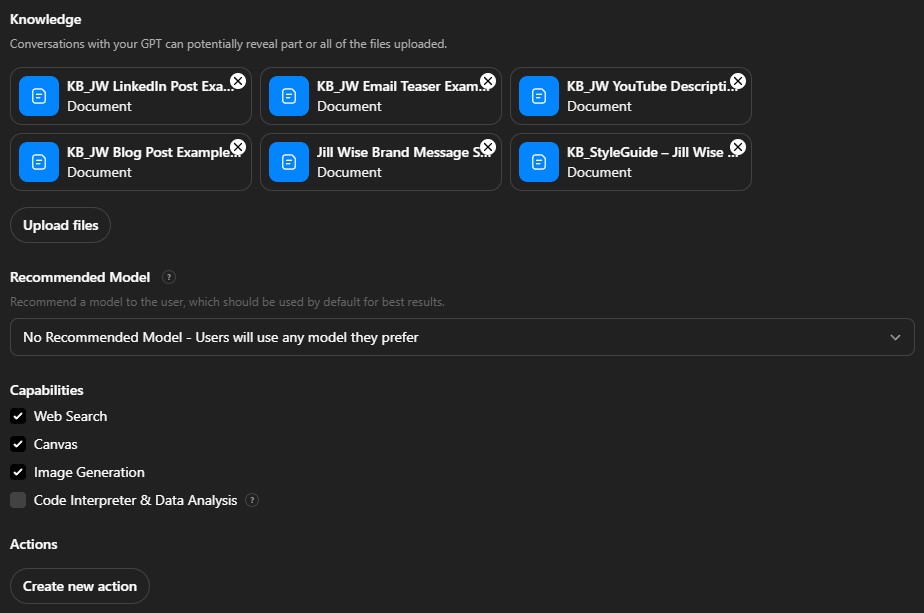
This is where most people either overdo it or underdo it. When deciding how to build a custom GPT that fits your business, you need to consider the information your new GPT will need. Give it just enough. Not too little that it can’t do the job required. Not so much that it gets confused.
Your knowledge base should include:
- SOPs
- Frameworks
- Examples of “good” work
- Style guides or rules
- Reference documents the GPT should rely on
- Tone information on how to communicate with the user
Quality matters more than quantity. Conflicting or outdated documents will confuse the model.
I also keep a simple tracking sheet for:
- What files exist
- What each file is for
- When it was last updated
- Which GPTs use it
- When those GPTs were last updated
Here’s an example of how to build a custom GPT with a specific, intentional knowledge base. This is for a content repurposer GPT that I use personally.
Step 5: Set capabilities intentionally
Decide what this GPT actually needs access to:
- Web browsing
- Data analysis
- File uploads
More capabilities ≠ better GPT. Too many steps can weigh down the system prompt and cause more hallucinations. Only enable what supports the role you defined in Step 1.
Step 6: Test with real scenarios, not hypothetical ones
Testing isn’t about asking, “Is this smart?”
It’s about asking:
- Would I trust this in my workflow?
- Does this reduce friction or add it?
- Does it stay within its role?
Test with real tasks you already do, not idealized examples. I start by giving ChatGPT my system prompt and having it create tests for me to run, but then also test it in real use cases.
Step 7: Refine, document, and revisit
A custom GPT is not “set it and forget it” after you build it.
As your business evolves:
- Your strategy changes
- Your standards improve
- Your workflows shift
Your GPT should evolve too. This is why you need a tracking database for all your GPTs! You should keep these organized so you know which tool does what, just like you’d track a human team.
This is why I treat GPTs as team members in development, not static tools.
Common custom GPT problems and how to fix them
Even well-built GPTs can drift or underperform. The key is knowing where to adjust instead of scrapping the whole thing. Here are the most common issues I see, and how to resolve them.
“I don’t know how to build a custom GPT that actually works”
There’s so many viral videos talking about how to build a custom GPT in 5 minutes that most people miss the point. Just because you can build these quickly doesn’t mean those custom GPTs will serve the purpose you need them to within your workflows. Follow the instructions in this blog post, and you’ll get better results.
“My GPT isn’t using my knowledge files”
This is one of the most common frustrations.
Possible causes:
- Files are too long or unfocused
- Files contradict each other
- The system prompt doesn’t tell the GPT how or when to use the files
- The task doesn’t clearly require the knowledge base
How to fix it:
- Break large docs into smaller, purpose-driven files
- Remove outdated or redundant content
- Explicitly instruct the GPT when to reference knowledge files
- Organize the knowledge files for the GPT to better scan and understand… ex. Try adding an index or table of contents to the top of each file
- Test with prompts that clearly require the uploaded information
“The outputs are inconsistent or off-brand”
This is rarely a model problem. It’s usually a clarity problem.
Possible causes:
- Vague tone instructions
- No examples of finished work
- Conflicting brand guidance
- Too much creative freedom for the use case
Remember: Better input = better output. What would a human need to do this job well?
How to fix it:
- Add examples of ideal outputs
- Clarify tone, audience, and non-negotiables
- Reduce optionality for client-facing GPTs
- Move subjective decisions back to the human when needed
“My custom GPT keeps doing things I didn’t ask it to do”
This is a boundary issue. If a GPT is over-helpful, it’s because you didn’t tell it where to stop. The silly little robot is trying to do a good job and give you the answer it thinks is most likely.
How to fix it:
- Add explicit exclusions to the system prompt
- Define what the GPT should not do
- Clarify when it should ask clarifying questions instead of assuming
“It feels like more work instead of less”
This is the biggest red flag that something is off for your entire system design. If a GPT increases cognitive load, it’s misaligned with your workflow.
Possible causes:
- The GPT was built before the system was clear
- You’re asking it to replace thinking instead of support it
- The role is too broad
How to fix it:
- Audit your overall workflow and the GPT’s place within it
- Revisit the original role definition
- Narrow the scope
- Re-anchor the GPT to specific decisions or tasks
A good GPT should feel like relief, not another thing to manage.
When to rebuild your custom GPT vs refine
You don’t always need to start over.
Refine when:
- The role is still accurate
- The outputs are close but not consistent
- The issue is clarity or inputs
Rebuild when:
- The role was never clear
- The business has shifted significantly
- The GPT no longer fits how you work
This mirrors human teams too. Sometimes you coach, sometimes you restructure.
Why most custom GPTs break without a brand foundation
Without clarity, GPTs drift. Outputs become inconsistent. Decisions feel random. People assume the tool failed when the real issue is missing context.
That’s why every GPT I build is anchored to a brand foundation. If you don’t have this yet, check out my AI-Ready Brand Brief.
It acts as the source of truth for:
- Brand voice and positioning
- Audience clarity
- Strategic constraints
- Decision-making frameworks
It’s a living system. When the brand evolves, this brief needs to be updated too. If you’re struggling to integrate AI, this is the tool you start with! It’s free—learn more about the AI Ready Brand Brief here.
Good AI tools don’t replace thinking—they create space for you to think more creatively
I’m not here to sell shortcuts or tools in isolation. My literal job is strategy, which requires creative and critical thinking. My AI tools all eliminate the stuff that bogs me and my clients down. The repetitive stuff. The busywork. The things you don’t want to do.
When we work together, my goal is to help you think better, stay accountable to your goals, and execute without burning out because your business model and systems support you as a human being.
GPTs can support that when they’re designed intentionally, inside a larger system of strategy and reflection.
If you want to self-serve and get better at marketing now, my GPTs can help. If you want a thinking partner to help you see what you can’t see and build systems that hold, that’s where coaching and consulting come in. All options help you create space for better.