




Yes, Claude Pro is worth it if you use it to run work you repeat every week, not just to answer questions. At $20 USD a month, it’s the cheapest agentic support a service business can add this year. Even with the race for market share in AI, and things changing every day, I think 2026 was the year Anthropic solidified Claude as the solid option, especially for running automations that trigger and complete work consistently.
If you only want a smarter search bar, the free plan, or the ChatGPT you already pay for, will do the job.
That’s the short answer. The longer one is more useful, because most people who decide Claude isn’t worth it never set it up to do the thing it’s best at.

What’s possible with Claude Pro?
Is Claude Pro worth it for a business owner to invest in? Let me paint a bit of a picture of my day to day, so you can understand how truly impactful Claude has been on my business this year.
I run my businesses in part-time hours around my kids schedules. I’m the SAHM, the consultant, the content creator, and the AI tech founder on any given day. Is Claude Pro worth it? Absolutely yes. Claude is the consistent, always-on support staff I wish I had years ago. I’m not at my desk for that many hours each day. I work on the go, from my phone, or take meetings when I am at my desk. Claude holds things down for me.
One morning every week, I go on a hike with a group of local founders. Normally my daily brief is waiting on my Notion dashboard when I sit down. But I wanted to try a voice setting this time because it was a busy day and I didn’t have time to check in before leaving the house at 6am. One hike day, my Claude agents briefed me on a launch update while I was on the go, and when they finished, I asked them to draft an email around ideas I had from that brief, and add it to the launch queue directly in my email marketing platform. If you’d told me that was possible a year ago, I would have laughed at you.
It was like phoning a team member on a busy day, except I called in my AI agents.
Working well with Claude Pro needs more than a fancy prompt
Honestly, how I prompt Claude these days would make most people cringe. But the research backs me up! Prompting Claude in a way that allows it to think outside the box rather than controlling every input is good. We don’t always want to be overly simple. Good context adds variability to a general purpose tool based on probability. But you also don’t need to fall for the hype of the viral prompts you see online.
None of that happened because I found a clever prompt. It happened because of the systems I’ve built into Claude Code. If this isn’t reason enough to convince you that Claude Pro is absolutely worth it, let’s look at what you actually get for $20, what it can run, where it runs out, and how to tell if it’ll pay for itself in your business.
What do you get with Claude Pro?
Claude Pro is Anthropic’s ~$20 USD a month plan. Don’t quote me on that if this number becomes outdated because the point is that it’s so affordable for what it does! It’s the first tier that includes the parts that make Claude useful for running a business, not just chatting with it:
- Unlimited Projects, so each part of your business can have its own workspace with your documents and instructions already loaded.
- Skills, which are written instructions for how a specific job gets done, so Claude does it the same way every time.
- Claude Code and Cowork, which is where scheduled tasks and multi-step agents live.
- Connectors to the tools you already use, like Notion, Gmail, Google Calendar, Slack and Microsoft 365.
- Research and the stronger models, which the free plan doesn’t include.
Here’s how the plans compare right now, in Q4 of 2026:
| Plan | Price (USD) | Who it’s for |
|---|---|---|
| Free | $0 | Trying Claude out. Lighter models, lower limits, no Claude Code. |
| Pro | $20/month, or about $17/month billed annually | One business owner running their own systems. |
| Max | $100/month | Heavy daily automation. About 5x Pro’s usage. |
| Ultra (formerly Max 20x) | $200/month | Running agents most of the day, every day. |
| Team | From $25/seat/month (2-seat minimum) | Shared workspace and admin controls for a team. |
Prices from claude.com/pricing, checked November 2026. Anthropic changes plans and limits often, so check before you buy.
The price is the same as ChatGPT Plus. So if you’re thinking about switching, the real question was never whether $20 is a lot of money. It’s whether Claude earns its seat in your stack.
Is Claude Pro worth it for a small business owner?
It depends less on the tool and more on how you work. Before you pay for anything, ask yourself three questions.
1. Do you repeat the same work every week?
Proposals, client onboarding, follow-ups, a weekly email, an estimate, a call summary. If you do the same kind of job over and over, Claude is built for you.
My AI division typically looks like this: I use ChatGPT for brainstorming and back-and-forth planning, and Claude for the routine automations most businesses need, because it’s the most consistent at doing the same thing every time. Grok bots are an additional layer on top that manage my sales pipeline and inbox—things that I want to be centralized into the easy phone app and more reactive in nature.
2. Does what you know live only in your head?
If your positioning, your process and the decisions you make on instinct aren’t written down anywhere, any AI will give you generic answers. It sounds like no one because you told it nothing. Context is the one thing that changes the output, and context is just your knowledge written down somewhere AI can reach.
Claude Pro will still be worth it for you, but you need to build a business brain first. I show you exactly how to do that inside Leverage Lab.
3. Are your tools scattered?
If your client info is in email, your tasks are in Notion and your calendar is in Google, Claude Pro’s connectors are where the value starts. Your agents can work where you work instead of in a browser tab that resets every time you close it.
If you answered yes to the first question, Pro will almost certainly pay for itself. If you answered yes to the second and third, that’s not a reason to skip it. It’s the setup work that makes it pay off.
What does $20 a month actually run in my business?
This is the part most reviews skip. Here’s what runs on Claude in my business on a normal week. Each one is a routine that spins up agents with specialized skills to act inside my workspaces.
My orchestration layer in Claude Pro
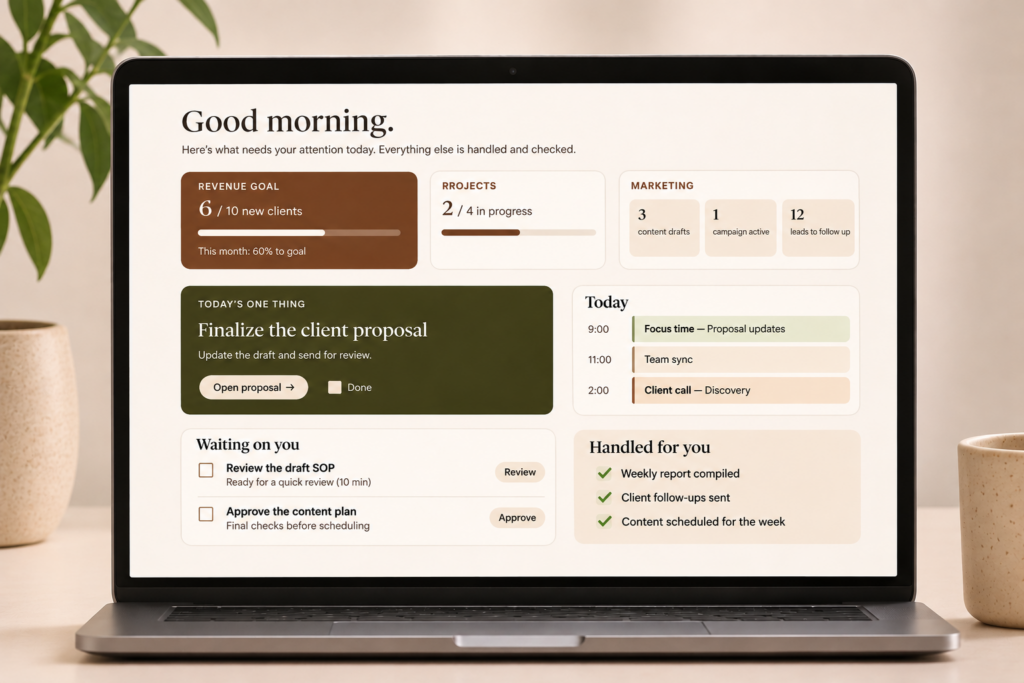
A daily brief across every client and channel. It’s waiting on my dashboard when I sit down: client agendas first, sales second, then quick hits (anything that takes 15 minutes or less) at the bottom. This is one of the reasons I’ve been able to double my capacity this year. I keep track of everything without holding it all in my head.
Every other agent reports to this morning brief agent in some way. They all report up, just like in a typical organizational structure. I don’t need to see every detail every day, just the most important things.
My dashboard looks like this, and all of my clients get a templated version with their morning briefing agentic skill to build one for themselves. They get to brand it for their business, and train the agent that runs it on their daily priorities.
Support systems that run in Claude Pro
A daily sales agent. Over a year ago I challenged myself to do at least 1 sales activity every single day, because that effort compounds. Now my agent helps me choose what that is, tracks where everyone is in the pipeline and drafts the outreach.
Planning my week into real time blocks. I’ve time-blocked for years. Before AI, that meant 30 minutes every week fitting projects into the blocks. Now it’s done for me, so I know my to-do list for the week is actually realistic.
Proposals, without paying for Dubsado. I used to run every client proposal through a separate piece of software, with a separate monthly bill, and I still had to write the proposal myself. One skill replaced it. It’s trained on the same proposal template that’s closed five-figure deals for me for years, and it turns a discovery call into a branded proposal that’s ready for my review.
My content drafts. A system that looks at what worked last week, what I’m promoting, and my bank of ideas, then drafts for the channels I’m showing up on.
A weekly health check and backup. It finds the gaps, the failures, and the places where agents are waiting on me as the bottleneck. Then it backs up every skill and routine to GitHub, so if my computer died tomorrow, I could reinstall everything.
Claude Pro runs my AI-native business
This is just a small look at it—my entire business is AI-native now with multiple tasks running automatically. I don’t even have to work inside Claude to work with Claude anymore. My whole task list, mine and my AI’s, lives on one Notion board. I assign Claude tasks right from there without opening Claude at all, and it reads the board the same way a new hire would.
Here’s what that adds up to: I keep going all day, even if I’m not personally working all day. Honestly, I work 2 to 4 hours most days.
What have real business owners built with Claude?
Your business isn’t mine, so here’s what people in Leverage Lab have built with Claude. These are owners of trades, architecture, bookkeeping, tourism and marketing businesses, most of whom had never built anything with AI before.
- A custom home builder now has Claude build the base of every estimate in his project software. “Something that would have taken me, you know, over the course of five days, probably 20, 25 hours can be done in… 10 minutes and then a couple hours of review from me.”
- The same builder has an admin agent that pulls invoices from his email and codes them by job. “So far out of 20 invoices, only 1 has needed manual coding!”
- A tour company owner’s trip sheets used to take at least half an hour per booking. Now Claude reads the booking, calculates drive times and builds the sheet, and he just reviews it.
- An architecture firm partner drafted 4 client proposals in 2 hours, then used Claude to pull zoning rules off a city website. She landed 3 new projects the same day.
- A fractional marketer built 48 ads in less than a day. That job used to take her a full week.
- A garage door company owner had her agent rewrite every SOP her team uses, overnight.
None of them got there by chatting with Claude more, or having a better prompt. They built from a framework that’s effective and scalable.
Claude Pro vs ChatGPT Plus: which should you pay for?
They cost the same $20 a month, so this is a question about jobs, not price.
I still use ChatGPT, and I’m not going to pretend otherwise. I built a custom GPT that saves me 8 hours on every new messaging strategy client. Here’s how I build custom GPTs the right way. ChatGPT is where I think out loud. I talk through a new project with voice-to-text, have it check my Notion for my current direction and capacity, and once I’m happy with the plan, it becomes task cards on my board, assigned to Claude to pick up overnight.
Claude is where the repeatable work runs. The reason is skills. A custom GPT is set up once and does one job. A Claude skill is closer to hiring someone: you write down exactly how you want a job done, the way you’d train a new hire, and every agent that needs it follows the same standard.
So if you’re deciding between them, it’s not really Claude versus ChatGPT. It’s this: do you need one well-trained specialist, or a business’s worth of them, all working from the same standard?
You also don’t have to marry either one. Keep your business brain in Notion and your skill files backed up, and you own your system. If something better comes along, you can tell the new tool to go into your Notion and GitHub and reinstall everything. Claude is currently the strongest for automations, but you’re not tied to it. I use ChatGPT, Grok Bots, and Gemini too.
Will you hit Claude Pro’s usage limits?
If you start running automations, probably, at least at first. Claude Pro doesn’t include a fixed number of messages. Your usage runs in sessions that reset every 5 hours, plus a weekly limit. How fast you use it depends on how long your conversations get and how much you ask it to read and write.
There are a few things you can do to make your systems more efficient with token usage. Here’s how I make the same $20 go further when you’re just starting out. For most owners, a Pro plan plus the occasional top-up (staying under about $100 a month) is plenty, even with real automations running.
How to maximize Claude Pro’s usage limits to work longer
Start your window before you sit down. Your session window starts when you first use Claude. So if you start at 9am and hit your limit at 11am, you’re waiting until 2pm to keep going. That’s most of your best hours gone.
The fix: set a scheduled task to run early, like 6am. It can be as simple as “review my inbox and summarize my calendar for the day.” By the time you start work, your window is already running, and your reset lands around 11am, right in the middle of your day. (Scheduled tasks on the desktop app only run while your computer is on, so leave it on overnight.)
Schedule the heavy work off-peak. Peak hours are roughly 5 to 11am Pacific, when usage burns faster. If a task would take a person more than about 30 minutes, schedule it outside those hours. My overnight agents run starting around 7pm, then again around 8 and 10pm.
Write a better first prompt. Long back-and-forth chats get expensive fast, because every new message re-reads the whole conversation. Make your first message as specific as you can. If Claude goes off track, edit your last message instead of piling on corrections.
Keep your progress outside the chat. Store ongoing work in Notion or a project list, not in one long chat thread. It’s cheaper, Claude makes fewer mistakes, and the next session can pick up exactly where the last one left off.
Top up instead of panicking. If you run out, check when your window resets. If it’s soon and nothing is urgent, wait, and your automations pick up again after the reset. If you need to keep working today, top it up. About $10 goes a long way.
When should you upgrade to Claude Max?
Upgrade when Pro becomes a consistent hassle because you keep getting interrupted or running out of usage early in your week, not before. The signs:
- You’re topping up every week, and the top-ups are getting close to the $100 Max price.
- Your scheduled agents keep stalling on limits even after you’ve moved heavy work off-peak.
- You’re running agents for more than one business or team member from a single account.
If none of those are true, stay on Pro and spend the difference on your time. Paying for more usage won’t fix a system that isn’t set up well. It just lets a messy system make more mess and cost you more.
When I first started hitting walls, I had Claude run a full audit on the entire system: Fable 5 reviewed every skill, scheduled task or rourtine run, memory files stored locally and in Notion… literally everything. Then we worked together to make each workflow run more efficiently without breaking the output.
That bought me more time to stick with the $20 hr plan because everything ran way more smoothly.
Why do some people decide Claude Pro isn’t worth it?
Whenever someone tells me they think Claude Pro isn’t worth it, I dig deeper and immediately see that they just aren’t using it right.
Claude is not the same as ChatGPT. You can’t just talk to it forever. It’s more nuanced, and I think more effective because of that.
Most people who cancel didn’t pick the wrong tool. They skipped the setup. They paid the $20, typed a few prompts, got answers that sounded like they could belong to anyone, and decided AI was overhyped.
Or worse, you got Claude and are using it like a Google machine. That’s not what Claude is.
If you’ve tried Claude and aren’t sure, you’re probably using it the wrong way so you can’t see its full capability.
How to use Claude Pro the right way
Claude needs context, memory, and tools to function properly for you. Sure it can be a helpful research and brainstorming partner. It can edit things you copy / paste into the conversation. But it can be so much more than that too.
If you build a system before the foundation exists, it has nothing to draw from. No second brain, no messaging library, no context. It just sits there, waiting for a version of you with more hours who was never coming.
Here’s the order that works. I teach it as 3 kinds of leverage:
- Leverage your intelligence. Get what’s in your head into a business brain AI can read: your positioning, your process, your offers, the way you make decisions.
- Leverage your systems. Connect your tools, then build skills and routines for the work you repeat, so the pieces actually talk to each other.
- Leverage yourself. Once the first two are running, you get to show up only for the parts of the business that need you.
Do it in that order and $20 a month buys you a team. Skip ahead and it buys you another subscription.
And no, you don’t need a perfect week to build it. The systems are what hold when you have a messy week. That’s the point of them.
How to get your $20 back in your first week
If you’ve just signed up, or you’re about to, do these three things before you judge it.
1. Build one Project for your business. Add the documents that explain how your business works: your offers, your ideal client, your process, a few examples of your best work. This is the start of your business brain. Even better if you build this externally, like in Notion.
2. Turn one repeat job into a skill. Pick something you did last week that you’ll do again next week. Walk Claude through how you do it, then ask, “would it make sense to save this as a skill?” Next time, it comes out the same way.
3. Schedule a daily brief for 6am. Have it check your email and calendar and tell you what needs you today. It starts your usage window early, and it’s the fastest way to feel what Claude can actually do.
One Lab member has a rule I love. If a repeat job takes her 15 minutes, she spends those 15 minutes setting up an agent to do it instead. Try that this week.
Claude Pro FAQ: Is Claude Pro Worth it?
Is Claude Pro worth it if I already pay for ChatGPT Plus?
Yes, if you have repeatable work to automate. They’re the same price and they’re good at different jobs. Use ChatGPT for brainstorming and Claude for work that needs to come out the same way every time. If you only use AI for occasional questions, one subscription is enough.
Is Claude Pro worth it for beginners?
Yes, but start smaller than you think. One Project, one skill, one scheduled brief. Most beginners get stuck by trying to build everything at once, not because Claude is too technical.
Does Claude Pro include Claude Code?
Yes. Claude Code and Cowork are included on Pro, and that’s where scheduled tasks and multi-step agents run. The free plan doesn’t include them.
How much does Claude Pro cost?
$20 USD a month, or about $17 a month if you pay for a year upfront. Max is $100 a month and Ultra is $200 a month.
What happens when I hit my Claude Pro limit?
You wait for your 5-hour window to reset, or you top up. Check the reset time in Settings, then Usage. To avoid it, start your window early with a scheduled task and move heavy jobs outside 5 to 11am Pacific.
Is Claude Pro or Max better for running AI agents?
Start on Pro. Move to Max when you’re topping up every week and the top-ups are approaching $100 a month.
Want help building Claude AI agents?
If you want to use Claude well, you need to focus on the broad system: Building the business brain, the connections and the skills that make it do anything for you. This helps it go from a chatbot to an agent that can act for you.
That’s what Leverage Lab is for. Over 8 weeks, you build your business brain, connect your tools and set up your first agents, with me and a small group of business owners doing the same.
👉 See what you’ll build in Leverage Lab
Not ready yet? Start with the free AI systems diagnostic. It shows you where your business depends on you right now, and where it doesn’t have to.
Your current way of operating got you here, but you don’t have to be the only one holding it all together to reach your next level.